
A STOCK ALERT APP COMPARISON
 Stockletvs
 Investing.com
Focus on your stocks or the wider market.
Investing.com covers many markets and economic events. Stocklet concentrates on selected-stock notifications, including supported company events.
Reviewed 2026-11-07 Published by Stocklet
THE SHORT VERSION
Stocklet focuses on the companies you follow.
Set price rules and select supported company events for the stocks on your watchlist.
- Selected-company event categories
- Dedicated insider and analyst alerts
- A focused stock watchlist workflow
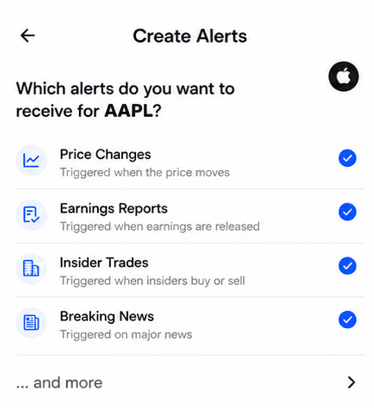
Choose a stock. Pick the updates that matter to you.
THE DECISION
Which app fits your workflow?
When Stocklet fits
You follow a defined list of companies and want their supported insider, analyst, news and earnings events in one alert workflow.
When Investing.com fits
You monitor multiple asset classes, macroeconomic releases or broad market-moving news.
- Broad market and asset coverage
- Economic-calendar alerts
- Price, percentage and mobile news alerts
FEATURE BY FEATURE
Compare the details.
Documented capabilities and plan details, checked 2026-11-07. Compare the exact alert and subscription you need.Scroll sideways to see the full table
| Feature |  Stocklet | Investing.com |
|---|---|---|
| Price alerts | ||
| Target-price alerts | Custom target priceView source ↗ | Price alerts for instrumentsView source ↗ |
| Percentage-move alerts | Percentage-move ruleView source ↗ | Percentage-change alertsView source ↗ |
| Company events and news | ||
| Insider-trade notifications | Supported reported transactions; Free plan includes insider alertsView source ↗ | Not verified in the reviewed official sources |
| Earnings alerts | Releases, calls and transcripts; ProView source ↗ | Earnings alert option shown on stock pages; check delivery and regionView source ↗ |
| Breaking stock news | Selected-stock breaking news; ProView source ↗ | Breaking market-news push alerts; company filtering not verifiedView source ↗ |
| Company press releases | Company press releases; ProView source ↗ | Not verified in the reviewed official sources |
| Analyst upgrades and downgrades | Upgrades and downgrades; Free plan includes analyst alertsView source ↗ | Not verified in the reviewed official sources |
| Analyst price-target changes | Analyst target changes; Free plan includes analyst alertsView source ↗ | Not verified in the reviewed official sources |
| Workflow and access | ||
| Watchlist | 3 stocks on Free; unlimited on ProView source ↗ | Custom portfolio and watchlistView source ↗ |
| Mobile push notifications | Mobile push; delivery priority differs by planView source ↗ | Mobile push for alerts and market newsView source ↗ |
| Platforms | iPhone; Android listed on Stocklet's site—store availability should be checkedView source ↗ | iPhone, Android and webView source ↗ |
| Plan requirements | Free and Pro; see current plan detailsView source ↗ | Check current free and paid access for your alertView source ↗ |
“Not verified” means the reviewed official sources do not establish the capability; it does not mean the app lacks it. Availability can vary by plan, market and device. Published by Stocklet; this is not an independent performance test.
Focused companies or the wider market?
Investing.com documents alerts for prices, percentage changes and economic events. Its mobile app combines portfolio tracking, market quotes and breaking-news notifications. That breadth is useful if stocks are only one part of what you monitor.
Stocklet centers the workflow on selected companies. Its supported categories include price moves, insider filings, earnings, company news, press releases and analyst changes. Some require Pro.
When Investing.com is the better choice
If you follow currencies, commodities, global indices or macroeconomic releases alongside stocks, Investing.com provides a broader market workspace. Its breaking-news notifications should not be assumed identical to a selected-company alert; verify the filtering options in the app for the stocks you follow.
What to test
Create a price or percentage alert for the same stock in both apps, then inspect the news and earnings settings. Check whether the alert is tied to that company, a wider market topic or an economic event. Review platform and subscription requirements at the same time.
THE TAKEAWAY
Choose by the alert you need.
Investing.com is the better fit for broad markets and economic events. Stocklet is worth trying for a smaller set of stocks and specific supported company-event notifications. Check whether the exact news alert you want is available in each app.
Try StockletStocklet vs Investing.com: common questions
Answers based on the official sources linked throughout this comparison.
Does Investing.com support percentage-based alerts?
Yes. Investing.com documents price and percentage-change alerts for financial instruments.
Are its breaking-news alerts specific to my stocks?
The reviewed mobile page documents breaking market-news alerts. It does not establish that every alert can be restricted to an individual company; check the current app settings.