
A STOCK ALERT APP COMPARISON
 Stockletvs
 TradingView
The right signal starts with your workflow.
TradingView excels at chart-based and technical alert conditions. Stocklet centers the workflow on selected-company price and published company events.
Reviewed 2026-11-07 Published by Stocklet
THE SHORT VERSION
Stocklet focuses on the companies you follow.
Set price rules and select supported company events for the stocks on your watchlist.
- Company-event categories are central to alert setup
- Dedicated insider and analyst alerts
- Simple watchlist-led mobile workflow
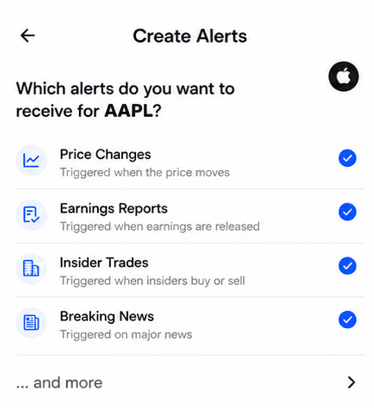
Choose a stock. Pick the updates that matter to you.
THE DECISION
Which app fits your workflow?
When Stocklet fits
You mainly want company news, reported insider activity and analyst changes alongside price rules.
When TradingView fits
You build alerts from charts, indicators, drawings or strategies, or need technical conditions.
- Chart, indicator, drawing and strategy alerts
- Multiple price-trigger operators
- Documented earnings and revenue report alerts
FEATURE BY FEATURE
Compare the details.
Documented capabilities and plan details, checked 2026-11-07. Compare the exact alert and subscription you need.Scroll sideways to see the full table
| Feature |  Stocklet | |
|---|---|---|
| Price alerts | ||
| Target-price alerts | Custom target priceView source ↗ | Multiple threshold operatorsView source ↗ |
| Percentage-move alerts | Percentage-move ruleView source ↗ | Percentage-moving conditions are classified as technical alertsView source ↗ |
| Company events and news | ||
| Insider-trade notifications | Supported reported transactions; Free plan includes insider alertsView source ↗ | Not verified in the reviewed official sources |
| Earnings alerts | Releases, calls and transcripts; ProView source ↗ | Earnings and revenue report conditions for stocksView source ↗ |
| Breaking stock news | Selected-stock breaking news; ProView source ↗ | Not verified in the reviewed official sources |
| Company press releases | Company press releases; ProView source ↗ | Not verified in the reviewed official sources |
| Analyst upgrades and downgrades | Upgrades and downgrades; Free plan includes analyst alertsView source ↗ | Not verified in the reviewed official sources |
| Analyst price-target changes | Analyst target changes; Free plan includes analyst alertsView source ↗ | Not verified in the reviewed official sources |
| Workflow and access | ||
| Watchlist | 3 stocks on Free; unlimited on ProView source ↗ | Watchlist alerts are a separate alert typeView source ↗ |
| Mobile push notifications | Mobile push; delivery priority differs by planView source ↗ | App notifications are an alert actionView source ↗ |
| Platforms | iPhone; Android listed on Stocklet's site—store availability should be checkedView source ↗ | Web, iPhone and AndroidView source ↗ |
| Plan requirements | Free and Pro; see current plan detailsView source ↗ | Alert limits vary by plan and typeView source ↗ |
“Not verified” means the reviewed official sources do not establish the capability; it does not mean the app lacks it. Availability can vary by plan, market and device. Published by Stocklet; this is not an independent performance test.
Company events or chart conditions?
TradingView gives traders detailed control over alerts created from price data, indicators, strategies and drawings. Its price-alert guide describes different crossing and threshold operators. It also documents earnings and revenue report alerts for stock instruments. These are meaningful advantages when a chart is where you make decisions.
Stocklet's emphasis is different. Follow a company, set a price rule and select supported published events such as insider transactions, news or analyst changes. You do not need to build an indicator condition to follow those categories.
When TradingView is the better choice
Choose TradingView if you rely on trendlines, technical indicators, multiple chart conditions or a chart-based alert manager. TradingView also offers mobile app notifications. Its alert allowances vary by plan and alert type, so check those limits for your intended setup.
What to test
Try one price threshold and one earnings-related alert in both products. An earnings report alert is not automatically the same as an alert about an earnings call or transcript. If you need both technical triggers and company-event monitoring, the apps may complement each other.
THE TAKEAWAY
Choose by the alert you need.
Choose TradingView for a chart-led trading workflow. Choose Stocklet if the main question is what has been published about a company you follow. The two can also serve different roles.
Try StockletStocklet vs TradingView: common questions
Answers based on the official sources linked throughout this comparison.
Can TradingView send phone notifications?
Yes. TradingView documents app notifications as an alert action on its iPhone and Android apps.
Does TradingView offer earnings alerts?
Yes. TradingView documents earnings and revenue report alert conditions for stock instruments. Check the current plan and symbol availability.